單元課程3:Javascript基本設計應用
2.Javascript 基本程式設計介紹
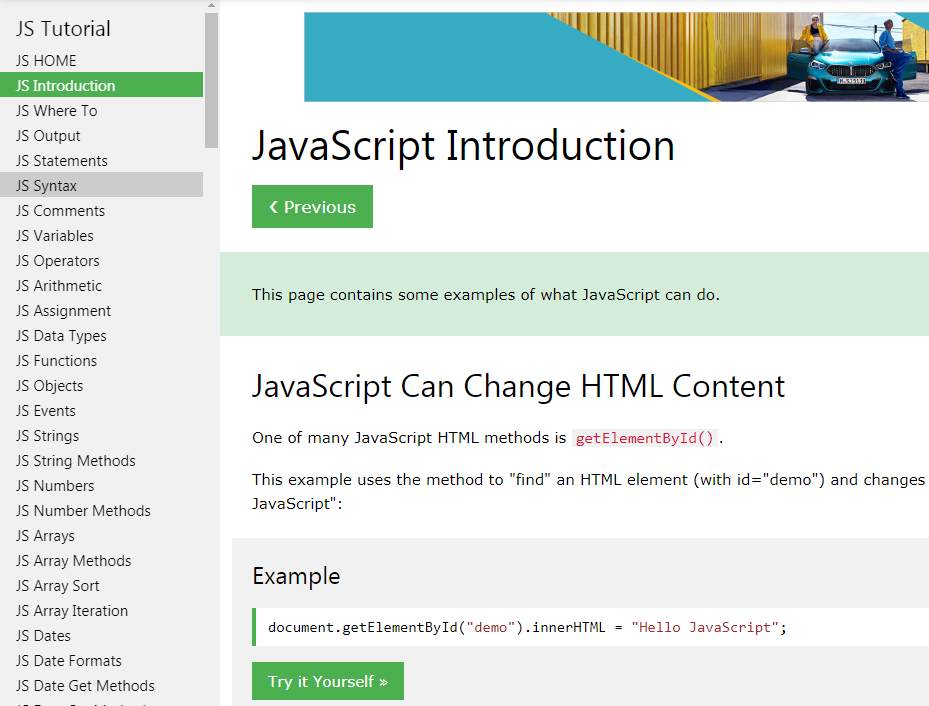
(1) https://www.w3schools.com/js/default.asp
JavaScript Can Change HTML Content
JavaScript Can Change HTML Attribute Values
JavaScript Can Change HTML Styles (CSS)
JavaScript Can Hide HTML Elements
JavaScript Can Show HTML Elements
(2) https://www.w3schools.com/js/js_whereto.asp
In
HTML, JavaScript code must be inserted between <script> and </script>tags.
A.JavaScript in <head>
B.JavaScript in <body>
(3) https://www.w3schools.com/js/js_output.asp:基本輸出
A.Writing into an HTML element,
using innerHTML.
B.Writing into the HTML output using document.write().
C.Writing into an alert box, using window.alert().
D.Writing into the browser console, using console.log().
(4) Javascript基本語法應用
A.https://www.w3schools.com/js/js_statements.asp:基本敘述
B.https://www.w3schools.com/js/js_syntax.asp :基本語法
C.https://www.w3schools.com/js/js_variables.asp:基本變數
D.https://www.w3schools.com/js/js_operators.asp:基本運算
E.https://www.w3schools.com/js/js_datatypes.asp:基本資料型態
(5)Javascript語法中的註記方式
A.https://www.w3schools.com/js/js_comments.asp
B.單行註記://
C.多行註記:/* …*/
D.英文大小寫的語法是不相同的。
(6)Javascript 中文學習資源參考:https://ithelp.ithome.com.tw/users/20065504/ironman/1259
2.Javascript 基本變換圖片設計
(1) https://www.w3schools.com/js/js_intro.asp
(2) https://www.w3schools.com/js/tryit.asp?filename=tryjs_intro_lightbulb :按鈕與圖片變換

(3)Javascript 互動程式介紹
<!DOCTYPE html>
<html>
<body>
<h2>What Can JavaScript Do?</h2>
<p>JavaScript can change HTML attribute values.</p>
<p>In this case JavaScript changes the value of the src (source) attribute of an
image.</p>
<button onclick="document.getElementById('myImage').src='pic_bulbon.gif'">Turn
on the light</button>
<img id="myImage" src="pic_bulboff.gif" style="width:100px">
<button onclick="document.getElementById('myImage').src='pic_bulboff.gif'">Turn
off the light</button>
</body>
</html>
//燈泡顯示標籤指令
<img id="燈泡ID" src="燈泡圖片" style="width:寬度大小">
//按鈕標籤指令
<button onclick="document.getElementById('燈泡ID').src='對應的亮燈圖片'">開燈</button>
3.Javascript函數基本介紹與應用
參考網頁:https://www.w3schools.com/js/js_functions.asp
(1)函數基本架構
<!DOCTYPE html>
<html>
<body>
<h2>JavaScript Functions</h2>
<p id="demo"></p>
<script>
//設計一函數myFunction(p1,p2),然後呼叫該函數,傳回計算值,顯示於網頁上。
function myFunction(p1, p2) {
return p1 * p2;
}
document.getElementById("demo").innerHTML = myFunction(4, 3);
</script>
</body>
</html>
(2)使用Microsoft Expression Web 4設計 javascript 程式控制燈泡開闗。
A.直接將javascript 指令,寫在 <botton onclick="javascript指令">,經按鍵觸發後執行。
<!DOCTYPE html>
<html>
<head>
<title>Javascript互動測試</title>
</head>
<body>
<h2>按鈕與圖片互動設計</h2>
<button onclick="document.getElementById('myImage').src='pic_bulbon.gif'">開燈</button>
<img id="myImage" src="pic_bulboff.gif" style="width:100px">
<button onclick="document.getElementById('myImage').src='pic_bulboff.gif'">關燈</button>
</body>
</html>
B.將<button onclick="javascript指令"> 寫成function(),然後觸發執行函數。
<!DOCTYPE html>
<html>
<head>
<title>Javascript互動測試</title>
</head>
<body>
<h2>按鈕與圖片互動設計</h2>
<button onclick="turn_on()">開燈</button>
<img id="myImage" src="pic_bulboff.gif" style="width:100px">
<button onclick="turn_off()">關燈</button>
<script>
function turn_on(){
document.getElementById('myImage').src='pic_bulbon.gif';
}
function turn_off(){
document.getElementById('myImage').src='pic_bulboff.gif';
}
</script>
</body>
</html>