單元課程7:Google sheet_chart_資料視覺化設計應用
(參考資料:https://developers.google.com/chart/interactive/docs
)
1.Google chart 基本應用介紹
透過google雲端服務進行文件資料的編輯、儲存與應用,是目前的依重要趨勢之一。而使用google chart的雲端服務
亦是目前資料視覺化的可參考方式之一。使用的過程主要參考google所提供的google chart 外掛程式,基本應用架構參考如下。
(1)google chart 外掛程式宣告方式
<script type="text/javascript" src="https://www.gstatic.com/charts/loader.js"></script>
//設定使用的圖庫資源
google.charts.load('current', {'packages':['corechart']});
//設定文件載入後的執行函數
google.charts.setOnLoadCallback(drawChart);
(2)執行繪圖程式
function drawChart() {
// 建立資料表格
var data = new google.visualization.DataTable();
data.addColumn('string', 'Topping');
data.addColumn('number', 'Slices');
data.addRows([
['Mushrooms', 3],
['Onions', 1],
['Olives', 1],
['Zucchini', 1],
['Pepperoni', 2]
]);
// 建立視覺化圖形的大小及標題
var options = {'title':'How Much Pizza I Ate Last Night',
'width':600,
'height':400};
// 可依設計將不同的視覺化圖形呈現於網頁
var chart = new
google.visualization.BarChart(document.getElementById('chart_div'));
chart.draw(data, options);
}
(3)執行測式
|
HTML程式碼 |
執行結果 |
|
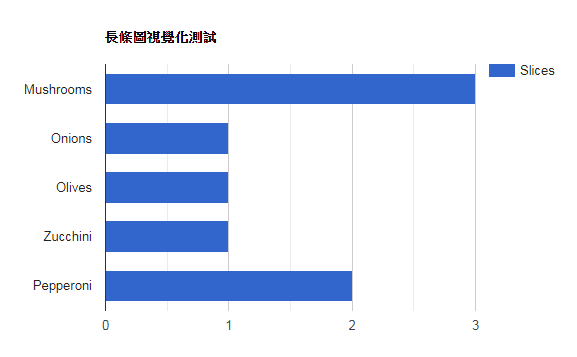
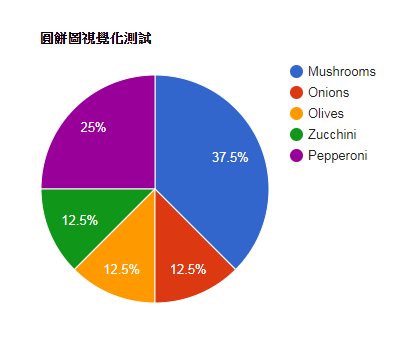
<html> <head> <!--Load the AJAX API--> <script type="text/javascript" src="https://www.gstatic.com/charts/loader.js"></script> <script type="text/javascript"> // Load the Visualization API and the corechart package. google.charts.load('current', {'packages':['corechart']}); // Set a callback to run when the Google Visualization API is loaded. google.charts.setOnLoadCallback(drawChart); // Callback that creates and populates a data table, // instantiates the pie chart, passes in the data and // draws it. function drawChart() { // Create the data table. var data = new google.visualization.DataTable(); data.addColumn('string', 'Topping'); data.addColumn('number', 'Slices'); data.addRows([ ['Mushrooms', 3], ['Onions', 1], ['Olives', 1], ['Zucchini', 1], ['Pepperoni', 2] ]); // Set chart options var options = {'title':'圓餅圖視覺化測試', 'width':600, 'height':400}; // Instantiate and draw our chart, passing in some options. var chart = new google.visualization.BarChart(document.getElementById('chart_div')); chart.draw(data, options); } </script> </head> <body> <!--Div that will hold the pie chart--> <div id="chart_div"></div> </body> </html> |
將繪圖指令以 BarChart() 和 PieChart() 呈現。 1. var chart = new google.visualization.BarChart(document.getElementById('chart_div')); 2. var chart = new google.visualization.PieChart(document.getElementById('chart_div')); |
|
|
|
|
|
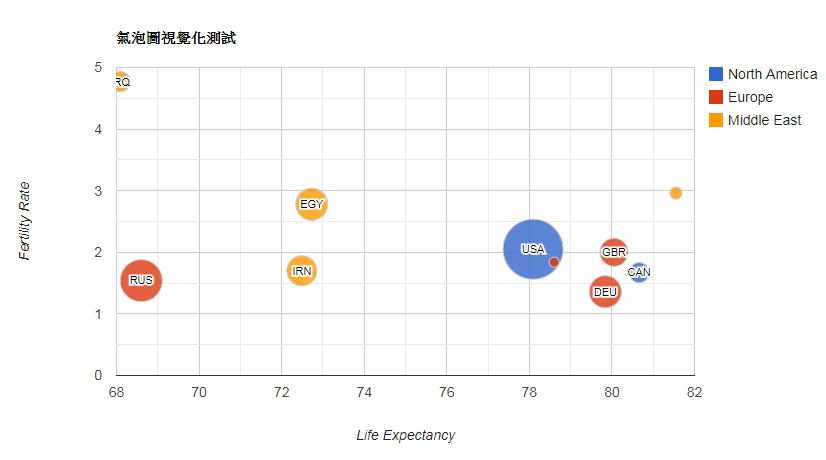
2.氣泡圖視覺化設計參考
|
HTML程式碼 |
執行結果 |
<html> <head> <script type="text/javascript" src="https://www.gstatic.com/charts/loader.js"></script> <script type="text/javascript"> google.charts.load('current', {'packages':['corechart']}); google.charts.setOnLoadCallback(drawSeriesChart); function drawSeriesChart() { var data = google.visualization.arrayToDataTable([ ['ID', 'Life Expectancy', 'Fertility Rate', 'Region', 'Population'], ['CAN', 80.66, 1.67, 'North America', 33739900], ['DEU', 79.84, 1.36, 'Europe', 81902307], ['DNK', 78.6, 1.84, 'Europe', 5523095], ['EGY', 72.73, 2.78, 'Middle East', 79716203], ['GBR', 80.05, 2, 'Europe', 61801570], ['IRN', 72.49, 1.7, 'Middle East', 73137148], ['IRQ', 68.09, 4.77, 'Middle East', 31090763], ['ISR', 81.55, 2.96, 'Middle East', 7485600], ['RUS', 68.6, 1.54, 'Europe', 141850000], ['USA', 78.09, 2.05, 'North America', 307007000] ]); var options = { title: '氣泡圖視覺化測試', hAxis: {title: 'Life Expectancy'}, vAxis: {title: 'Fertility Rate'}, bubble: {textStyle: {fontSize: 11}} }; var chart = new google.visualization.BubbleChart(document.getElementById('series_chart_div')); chart.draw(data, options); } </script> </head> <body> <div id="series_chart_div" style="width: 900px; height: 500px;"></div> </body> </html>
|
|
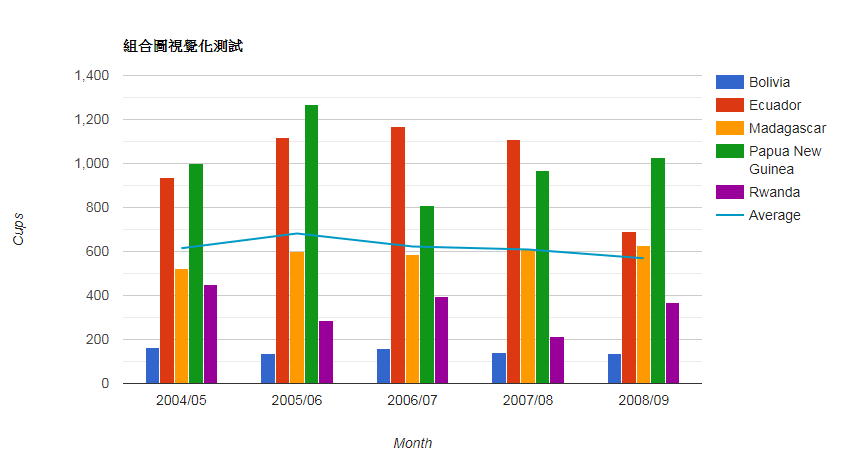
3.組合圖視覺化設計參考
|
HTML程式碼 |
執行結果 |
<html> <head> <script type="text/javascript" src="https://www.gstatic.com/charts/loader.js"></script> <script type="text/javascript"> google.charts.load('current', {'packages':['corechart']}); google.charts.setOnLoadCallback(drawVisualization); function drawVisualization() { // Some raw data (not necessarily accurate) var data = google.visualization.arrayToDataTable([ ['Month', 'Bolivia', 'Ecuador', 'Madagascar', 'Papua New Guinea', 'Rwanda', 'Average'], ['2004/05', 165, 938, 522, 998, 450, 614.6], ['2005/06', 135, 1120, 599, 1268, 288, 682], ['2006/07', 157, 1167, 587, 807, 397, 623], ['2007/08', 139, 1110, 615, 968, 215, 609.4], ['2008/09', 136, 691, 629, 1026, 366, 569.6] ]); var options = { title : '組合圖視覺化測試', vAxis: {title: 'Cups'}, hAxis: {title: 'Month'}, seriesType: 'bars', series: {5: {type: 'line'}} }; var chart = new google.visualization.ComboChart(document.getElementById('chart_div')); chart.draw(data, options); } </script> </head> <body> <div id="chart_div" style="width: 900px; height: 500px;"></div> </body> </html>
|
|